
Uber - Driver: Drive & Deliver
Uber Technologies, Inc.Business
4.6147.65K Reviews
- Version
- Varies With Device
- Installs
- 100.00M
- Age Rating
- Everyone
Screenshots
Our Review of Uber - Driver: Drive & Deliver
 Analysis by Appyee
I judge a driver app by what it helps me decide before I start moving: whether to go online, where to wait, and when a trip fits the rest of my day. Uber - Driver: Drive & Deliver is aimed at people who want to earn through Uber’s driving and delivery work, rather than book a ride as a passenger. It brings trip information, navigation, and earnings into one work-focused place. I would consider it most useful for someone who wants to choose working hours around other commitments, while keeping in mind that flexibility does not by itself guarantee steady income.
What the app is for today
Uber Driver is a free business app from Uber Technologies, Inc. Its role is practical: it is the driver-facing tool for people working with Uber, Uber Eats, and Postmates. The app has a 4.6 average from around 5.5 million ratings, and it has been installed over 100 million times. That scale suggests it is a well-established option, but it does not tell me whether a particular person will find enough suitable work in their own area.
The app is rated for Everyone, and its current version is 4.556.10001, with Android 9 as the minimum operating system. It first appeared on November 14, 2014. Those details help set expectations: this is a mature product that continues to receive version changes, not a new service whose basic purpose is still being tested. I would still check that my phone meets the system requirement before relying on it for a shift.
Deciding when and how to work
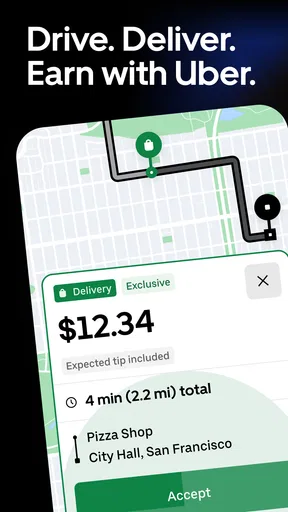
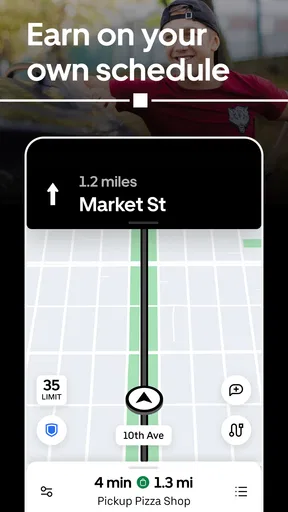
In the earlier version of the app, the map, trip navigation, and earnings summaries were the most useful parts of the day-to-day experience. Their value is less about looking impressive than reducing small decisions while I am working. A driver can check trip information, follow directions, and review earnings without treating a separate passenger-facing app as a work dashboard. That separation matters when the phone is already handling navigation and communication.
The destination option is worth thinking about as a planning tool, not a promise of a better-paying trip. If I already need to head across town, filtering for work that broadly points the same way may help make that time productive. The trade-off is that a preferred direction can limit which requests make sense, so I would use it when my own destination matters more than accepting every possible trip.
A realistic use case is someone finishing a daytime commitment and deciding whether to work for a while before going home. They can open the driver app, review the map, and decide whether the current area and available time make going online worthwhile. If a trip takes them away from where they need to be, the destination setting may help them weigh the detour against the value of accepting it. I would treat the map as guidance rather than a guarantee: a busy-looking area cannot ensure that a request will arrive at the right moment.
How it fits beside other choices
Compared with a general navigation app, Uber Driver is built around the working trip rather than simply getting from one address to another. Compared with a passenger ride-booking app, it is designed for the person doing the driving and tracking work. That focus is useful if Uber is already part of your plan, but it is not a universal solution for every kind of gig work. Someone who wants to compare several independent platforms may still need to consider each service’s own app and terms rather than expect one dashboard to represent the whole market.
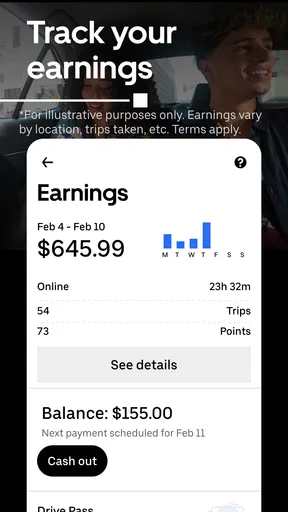
I would also separate the convenience of app-based work from the financial decision to do it. Earnings summaries can make completed work easier to review, but I would not make a budget based only on a strong day or assume the app controls demand. Before committing a regular block of time, it is sensible to track the hours spent waiting, driving to a pickup, and completing trips, then compare that with the amount shown as earned. This gives a more grounded picture of whether the work suits your circumstances.
Getting Started with Uber - Driver
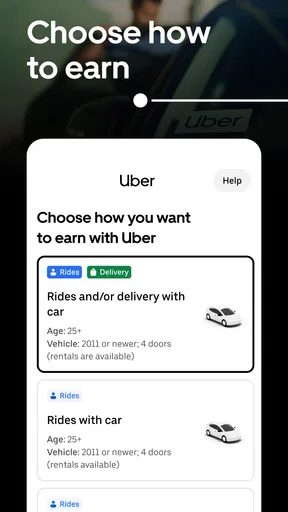
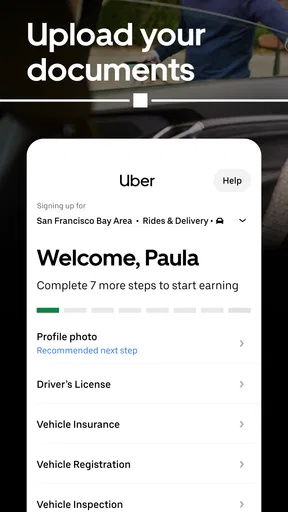
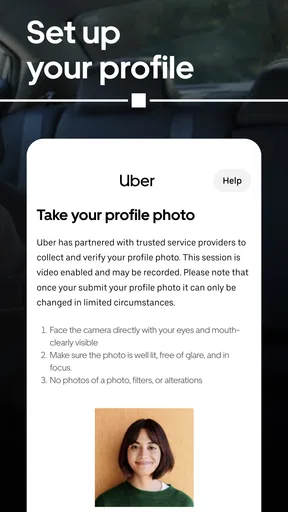
First up, the setup process. Downloading and signing up on Uber - Driver: Drive & Deliver is straightforward. The app guides you through every step, from uploading your documents to getting your vehicle inspected. It’s like having a personal assistant right on your phone. I was impressed by the user-friendly interface, which makes it easy for even the least tech-savvy among us.
Once you’re all set up, the app shows you a map with hot spots around your area. It’s quite intuitive, letting you know where the most rides are likely to happen. Uber really nails it with their navigation tools. I found the in-app GPS to be accurate, and it suggested the quickest routes, which is a lifesaver during rush hour.
Earning and Flexibility
Let’s talk money because, after all, that’s why we’re here, right? The app offers a breakdown of how much you’ve earned after each trip, along with a weekly summary. It’s transparent and lets you plan your week around your financial goals. There’s also flexibility to work whenever you want, which is a huge plus if you have an unpredictable schedule.
The app also has a handy feature where you can set a destination. This means you can pick up passengers heading in the same direction as you, perfect for those who want to maximize their earnings while sticking to a personal schedule.
Support and Community
One of the standout features of the app is the support system. If you run into any issues, help is just a few taps away. You have access to a 24/7 support team, which is incredibly reassuring, especially if you’re driving late at night.
Moreover, the app fosters a sense of community among drivers. There are forums and meetups where drivers can share tips and stories. It’s like being part of a club where everyone’s looking out for each other. This sense of camaraderie is something I didn’t expect but genuinely appreciated.
The Driving Experience
Driving with the app is, in a word, smooth. The interface is not cluttered, which means you can focus on the road without constant distractions. The app has thought of everything, from passenger ratings to trip history, ensuring you have all the information you need at your fingertips.
One thing I’d love to highlight is the safety features. The app includes emergency contact features and a follow-my-ride function, which lets your loved ones track your location. It’s these small details that make Uber - Driver: Drive & Deliver stand out in the crowded gig economy app market.
All in all, if you’re considering signing up to drive with Uber, this app makes it incredibly easy and efficient. It’s not just a tool; it’s like your partner on the road. So, if you’re looking for a flexible job with the opportunity to meet interesting people and make some money, this app is definitely worth a try.
Practical limits and a sensible first shift
The app is a better fit for a person comfortable making quick choices than for someone who wants a fixed schedule and predictable tasks. Requests, routes, and local conditions can change the shape of a shift, and the freedom to go online is not the same as control over how much work appears. If you need guaranteed hours or a stable paycheck, I would look at conventional part-time work instead. If you dislike driving with a phone giving directions, or would rather avoid carrying passengers, delivery-focused work may be a more comfortable option where available.
For a first shift, I would keep the plan modest: make sure the phone is charged, review the route before moving, and choose a time when I can learn the screens without rushing. I would avoid repeatedly checking the map while driving; it is better to make decisions while safely stopped and let navigation handle the route. After the shift, reviewing the trip history and earnings together can help identify whether time spent waiting or repositioning is affecting the result. That small habit is more useful than chasing every hotspot on the map.
What to keep in mind as it evolves
The version number and long history show that the product is maintained, but a version number alone does not explain which features changed or how those changes affect a particular driver. I would install updates through the usual app store process and read any in-app notices that affect the way I work. Existing users should be especially attentive to changes in screens or workflows: even a familiar tool can feel different when a control moves, so checking the app before starting a busy period is a reasonable precaution.
The main thing I would watch is whether future changes make routine tasks clearer without adding extra steps while a driver is on the road. Better organization of trip details and earnings would be valuable because those are the screens people rely on to plan and review work. Until a change is visible in the app, I would treat it as something to watch rather than assume it is coming. For now, the strongest reason to try Uber Driver is the direct link between its driver tools and Uber-based work; the strongest reason to hesitate is that the app cannot make local demand or personal earnings predictable.
If you already want to drive or deliver through Uber and meet the requirements to sign up, I think this is the natural place to manage that work. If you are still comparing gig options, use it as one piece of the decision rather than a promise that flexible hours will automatically suit your finances. The app can make the working day easier to organize, but the best test is whether its actual trips, routes, and earnings fit your own schedule after you have tried it carefully.
Privacy and Permissions
See what permissions an app requests and how it handles your data.
- Identity
- find accounts on the device
- Contacts
- find accounts on the device, read your contacts
- Location
- approximate location (network-based), precise location (GPS and network-based)
- Phone
- directly call phone numbers, read phone status and identity
- Photos/Media/Files
- read the contents of your USB storage, modify or delete the contents of your USB storage
- Storage
- read the contents of your USB storage, modify or delete the contents of your USB storage
- Camera
- take pictures and videos
- Microphone
- record audio
- Wi-Fi connection information
- view Wi-Fi connections
- Device ID & call information
- read phone status and identity
- Other
- view network connections, pair with Bluetooth devices, access Bluetooth settings, change network connectivity, full network access, change your audio settings, control Near Field Communication, run at startup, draw over other apps, control vibration, prevent device from sleeping
Verdict
Strengths of Uber - Driver: Drive & Deliver
- Flexible scheduling for drivers.
- In-app navigation is efficient.
- Easy earnings tracking.
- Driver support is responsive.
- Boost zones increase earnings.
Limitations of Uber - Driver: Drive & Deliver
- High commission rates on earnings.
- App can drain phone battery quickly.
- Inconsistent customer demand.
- Background checks can delay signup.
- Limited features in some regions.
Other Releases by Uber Technologies, Inc.
View All
Uber - Request a ride
Maps & Navigation4.7

Uber Eats: Food and Grocery
Food & Drink4.6

Postmates - Food Delivery
Food & Drink4.5
Similar Picks in This Category
View All
LinkedIn: Community & Network
LinkedIn3.8

Zoom Workplace
zoom.com4.1

Microsoft Teams
Microsoft Corporation4.6

Meta Business Suite
Meta Platforms, Inc.4.6

Webex Meetings
Cisco Systems, Inc.4.5

TeamViewer Remote Control
TeamViewer4.4
You May Also Like
View All


Frequently Asked Questions
What are the requirements to become an Uber Driver?
To become an Uber Driver, you need to meet certain requirements, including being at least 21 years old, having a valid driver’s license, and owning a vehicle that meets Uber’s standards. Additionally, you must pass a background check and have the necessary insurance in your area.
How do I sign up and start driving with Uber?
To start driving with Uber, download the Uber Driver app and create an account. You’ll need to provide personal information, upload required documents, and complete a vehicle inspection. Once approved, you can start accepting ride requests or deliveries through the app.
What is the earning potential for Uber Drivers?
Earnings for Uber Drivers vary based on location, time of day, and demand. Uber provides a fare estimate before each trip and offers incentives during peak hours. Drivers keep a significant portion of the fare, but should also account for expenses like fuel and maintenance.
How does Uber ensure safety for drivers and passengers?
Uber incorporates several safety features, including GPS tracking, a two-way rating system, and an emergency assistance button. Drivers must pass background checks, and both drivers and passengers can share trip details with trusted contacts during rides for added security.
Can I drive part-time with Uber, and how flexible is the schedule?
Yes, Uber is highly flexible, allowing drivers to choose their own hours and work as much or as little as they like. This flexibility makes it an ideal option for those seeking part-time work or supplemental income, as you can log in and out of the app at your convenience.
